

Are Indexes Nice to Have, or Are They Essential?
Database performance is very important when developing server applications. Whenever we read or write data, we inevitably access the database to retrieve or store that data. However, unless you are working in a real-world environment, it is difficult to work with enough data to actually experience database performance at a meaningful scale. Even when working on a side project, it is difficult to actually feel the impact of database performance and focus on optimization. So, I’m going to use AI to generate millions to tens of millions of dummy records and examine how execution plans and query execution times change in a real database depending on whether indexes are present, how queries are written, and how joins are performed.
Experimental Setup
I used Claude to generate dummy data for tables with no indexes other than their primary keys. The database schema is as follows.
CREATE TABLE users (
  id            BIGINT 	        NOT NULL AUTO_INCREMENT,
  email         VARCHAR(255)    NOT NULL,
  name          VARCHAR(100)    NOT NULL,
  country_code  CHAR(2)         NOT NULL,
  status        VARCHAR(20)     NOT NULL DEFAULT 'ACTIVE',
  created_at    DATETIME        NOT NULL,
  PRIMARY KEY (id)
) ENGINE=InnoDB;

CREATE TABLE categories (
  id          INT    	      NOT NULL AUTO_INCREMENT,
  parent_id   INT    	      NULL,
  name        VARCHAR(100)    NOT NULL,
  PRIMARY KEY (id)
) ENGINE=InnoDB;

CREATE TABLE products (
  id            BIGINT	        NOT NULL AUTO_INCREMENT,
  category_id   BIGINT	        NOT NULL,
  name          VARCHAR(200)    NOT NULL,
  price         DECIMAL(19,2)   NOT NULL,
  stock         INT             NOT NULL DEFAULT 0,
  created_at    DATETIME        NOT NULL,
  PRIMARY KEY (id)
) ENGINE=InnoDB;

CREATE TABLE orders (
  id            BIGINT 	        NOT NULL AUTO_INCREMENT,
  user_id       BIGINT	        NOT NULL,
  status        VARCHAR(20)     NOT NULL,
  total_amount  DECIMAL(19,2)   NOT NULL,
  created_at    DATETIME        NOT NULL,
  PRIMARY KEY (id)
) ENGINE=InnoDB;

CREATE TABLE order_items (
  id            BIGINT	        NOT NULL AUTO_INCREMENT,
  order_id      BIGINT	        NOT NULL,
  product_id    BIGINT	        NOT NULL,
  quantity      BIGINT          NOT NULL,
  unit_price    DECIMAL(19,2)   NOT NULL,
  PRIMARY KEY (id)
) ENGINE=InnoDB;
I generated approximately 2,000,000 dummy records for the users table, 200 for categories, 100,000 for products, 10,000,000 for orders, and 30,000,000 for order_items.
Using this data, I’ll examine database performance in a MySQL environment. I used MySQL 8.0.46.
What Happens Without an Index?
EXPLAIN ANALYZE
SELECT * FROM users WHERE email = 'user1500000@example.com';
The query above retrieves a specific user. The result is as follows.
mysql> EXPLAIN ANALYZE
    -> SELECT * FROM users WHERE email = 'user1500000@example.com';
+-------------------------------------------------------------------------------------------------------------------------+
| EXPLAIN                                                                                                                                                                                                                   |
+-------------------------------------------------------------------------------------------------------------------------+
| -> Filter: (users.email = 'user1500000@example.com')  (cost=208996 rows=198976) (actual time=880..1175 rows=1 loops=1)
    -> Table scan on users  (cost=208996 rows=1.99e+6) (actual time=5.59..1045 rows=2e+6 loops=1)
 |
+-------------------------------------------------------------------------------------------------------------------------+
1 row in set (1.23 sec)
We can see that MySQL performs a Table scan, reading the entire table from beginning to end without using an index.
rows=1.99e+6 means that approximately 1.99 million rows were read.
It took 5.59ms to read the first row and 1,045ms to complete the full table scan.
MySQL then checks each of the 2 million rows against the users.email = 'user1500000@example.com' condition through the Filter node.
The first matching row was found at 880ms, and the operation finished at 1,175ms.
Now, let’s add an index to email and measure the query again.
mysql> EXPLAIN ANALYZE SELECT * FROM users WHERE email = 'user1500000@example.com';
+-------------------------------------------------------------------------------------------------------------------------------------------------+
| EXPLAIN                                                                                                                                         |
+-------------------------------------------------------------------------------------------------------------------------------------------------+
| -> Index lookup on users using idx_users_email (email='user1500000@example.com')  (cost=0.35 rows=1) (actual time=0.246..0.254 rows=1 loops=1)  |
+-------------------------------------------------------------------------------------------------------------------------------------------------+
1 row in set (0.01 sec)
This time, we can see that MySQL uses an Index lookup instead of a Table scan, reducing the execution time to about 0.25ms compared to 1,175ms previously.
The Filter node that appeared before adding the index is gone as well. Overall, the query became roughly 4,700 times faster.
When You Don't Need to Access the Table
However, this measurement was based on a SELECT * query, and currently only email is indexed. So how are the other columns retrieved?
A secondary index leaf node contains only the email value and the primary key.
InnoDB uses the primary key obtained from the secondary index to traverse the clustered index once more and retrieve the actual row.
EXPLAIN ANALYZE
SELECT id, email FROM users WHERE email = 'user1500000@example.com';
Let’s measure the query above. The result is as follows.
mysql> EXPLAIN ANALYZE SELECT id, email FROM users WHERE email = 'user1500000@example.com';
+---------------------------------------------------------------------------------------------------------------------------------------------------------+
| EXPLAIN                                                                                                                                                 |
+---------------------------------------------------------------------------------------------------------------------------------------------------------+
| -> Covering index lookup on users using idx_users_email (email='user1500000@example.com')  (cost=1.1 rows=1) (actual time=0.265..0.306 rows=1 loops=1)  |
+---------------------------------------------------------------------------------------------------------------------------------------------------------+
1 row in set (0.01 sec)
First, we can see that Index lookup has changed to Covering index lookup.
The covering index can now provide all the data needed by the query.
However, the execution time is similar or even slightly longer.
This is probably because we are only reading a single row, so the effect of the covering index is not very noticeable.
Let's modify the query to retrieve multiple rows.
-- No covering index
EXPLAIN ANALYZE
SELECT id, email, name FROM users WHERE email LIKE 'user123%';

-- Covering index
EXPLAIN ANALYZE
SELECT id, email FROM users WHERE email LIKE 'user123%';
Comparing the queries above makes the effect of the covering index much more apparent.
mysql> EXPLAIN ANALYZE SELECT id, email, name FROM users WHERE email LIKE 'user123%';
+----------------------------------------------------------------------------------------------------------------------------------------------------------------------------------------------------------------------------+
| EXPLAIN                                                                                                                                                                                                                    |
+----------------------------------------------------------------------------------------------------------------------------------------------------------------------------------------------------------------------------+
| -> Index range scan on users using idx_users_email over ('user123' <= email <= 'user123???...?'), with index condition: (users.email like 'user123%')  (cost=9374 rows=20830) (actual time=8.86..42.5 rows=11111 loops=1)  |
+----------------------------------------------------------------------------------------------------------------------------------------------------------------------------------------------------------------------------+
1 row in set, 1 warning (0.10 sec)

mysql> EXPLAIN ANALYZE SELECT id, email FROM users WHERE email LIKE 'user123%';
+----------------------------------------------------------------------------------------------------------------------------------------------------------------------------------+
| EXPLAIN                                                                                                                                                                          |
+----------------------------------------------------------------------------------------------------------------------------------------------------------------------------------+
| -> Filter: (users.email like 'user123%')  (cost=6771 rows=20830) (actual time=0.414..9.52 rows=11111 loops=1)
    -> Covering index range scan on users using idx_users_email over ('user123' <= email <= 'user123???...?')  (cost=6771 rows=20830) (actual time=0.31..7.23 rows=11111 loops=1)  |
+----------------------------------------------------------------------------------------------------------------------------------------------------------------------------------+
1 row in set, 1 warning (0.01 sec)
The results can be summarized as follows.
| Total time | cost | |
|---|---|---|
SELECT id, email, name |
42.5ms | 9,374 |
SELECT id, email |
9.52ms | 6,771 |
The execution time differs by about 4.5×. The effect that was barely noticeable when retrieving a single row is now clearly visible.
Will Adding a UNIQUE Constraint Make It Faster?
Let’s change one more thing. Currently, email has an index, but there is no UNIQUE constraint.
So the optimizer cannot rule out the possibility that multiple rows may match a specific email address.
In fact, InnoDB also needs to read the next index entry after finding the first matching row to check whether there are any more rows with the same key.
So, if we add a UNIQUE constraint and guarantee that there can be "at most one row," will the lookup become faster?
Let's first take a look at the execution plan after adding the UNIQUE constraint.
mysql> EXPLAIN ANALYZE SELECT * FROM users WHERE email = 'user1500000@example.com';
+--------------------------------------------------------------------------------------------------+
| EXPLAIN                                                                                          |
+--------------------------------------------------------------------------------------------------+
| -> Rows fetched before execution  (cost=0..0 rows=1) (actual time=84e-6..126e-6 rows=1 loops=1)  |
+--------------------------------------------------------------------------------------------------+
1 row in set (0.04 sec)
The Index lookup node has disappeared, leaving only a single Rows fetched before execution line.
In other words, the table access has been eliminated from the execution phase.
When MySQL compares a primary key or unique index against a constant, it knows that there can be at most one matching row.
It can therefore fetch that row before execution and treat it like a constant.
Although actual time is shown as 126e-6, the actual row lookup was completed before the execution phase.
Therefore, this number cannot be used for performance comparisons.
With this experiment alone, we were not able to determine whether the UNIQUE constraint actually makes the lookup faster. However, we were able to confirm that when the optimizer knows there can be “at most one row,” the table lookup itself can be moved out of the execution phase and performed beforehand.
What If the Query Requires Sorting?
So far, we have only looked at conditions on a single column.
Now, let's see what happens when sorting is also required using the orders table.
EXPLAIN ANALYZE
SELECT id, status, total_amount, created_at
FROM orders
WHERE user_id = 12345
ORDER BY created_at DESC;
Running the query above produces the following result.
mysql> EXPLAIN ANALYZE SELECT id, status, total_amount, created_at FROM orders WHERE user_id = 12345 ORDER BY created_at DESC;
+--------------------------------------------------------------------------------------------------------------------------------------------------------------------------------------------------------------------------------------------------------------------------------------------------------------------------+
| EXPLAIN                                                                                                                                                                                                                                                                                                                  |
+--------------------------------------------------------------------------------------------------------------------------------------------------------------------------------------------------------------------------------------------------------------------------------------------------------------------------+
| -> Sort: orders.created_at DESC  (cost=998012 rows=9.71e+6) (actual time=2482..2482 rows=2 loops=1)
    -> Filter: (orders.user_id = 12345)  (cost=998012 rows=9.71e+6) (actual time=1146..2481 rows=2 loops=1)
        -> Table scan on orders  (cost=998012 rows=9.71e+6) (actual time=3.66..2160 rows=10e+6 loops=1)
 |
+--------------------------------------------------------------------------------------------------------------------------------------------------------------------------------------------------------------------------------------------------------------------------------------------------------------------------+
1 row in set (2.49 sec)
Because there is no index, we can see that MySQL performs a Table scan.
It takes 3.66ms to read the first row and 2,160ms to complete the full table scan.
For the rows it scans, the Filter checks the orders.user_id = 12345 condition.
The first matching row is found at 1,146ms, and filtering finishes at 2,481ms.
Only after filtering is complete does the sorting take place. The query finishes at 2,482ms, and the results are returned.
Now, let's add an index on user_id to the orders table and measure it again.
mysql> EXPLAIN ANALYZE SELECT id, status, total_amount, created_at FROM orders WHERE user_id = 12345 ORDER BY created_at DESC;
+--------------------------------------------------------------------------------------------------------------------------------------+
| EXPLAIN                                                                                                                              |
+--------------------------------------------------------------------------------------------------------------------------------------+
| -> Sort: orders.created_at DESC  (cost=2.11 rows=2) (actual time=0.15..0.151 rows=2 loops=1)
    -> Index lookup on orders using idx_orders_user_id (user_id=12345)  (cost=2.11 rows=2) (actual time=0.072..0.0755 rows=2 loops=1)
 |
+--------------------------------------------------------------------------------------------------------------------------------------+
1 row in set (0.10 sec)
Unlike before, we can see that the data is retrieved more quickly through an Index lookup.
It takes 0.151ms to find the two required rows using the index and sort them.
Compared to the 2,482ms before adding the index, this is about 16,000 times faster.
However, the Sort node is still present. The sorting step is still necessary.
So, let’s add a composite index on user_id and created_at and measure it again.
mysql> CREATE INDEX idx_orders_user_created ON orders(user_id, created_at);
Query OK, 0 rows affected (31.75 sec)
mysql> EXPLAIN ANALYZE SELECT id, status, total_amount, created_at FROM orders WHERE user_id = 12345 ORDER BY created_at DESC;
+---------------------------------------------------------------------------------------------------------------------------------------------------+
| EXPLAIN |
+---------------------------------------------------------------------------------------------------------------------------------------------------+
| -> Index lookup on orders using idx_orders_user_created (user_id=12345) (reverse) (cost=1.84 rows=2) (actual time=0.0875..0.128 rows=2 loops=1) |
+---------------------------------------------------------------------------------------------------------------------------------------------------+
1 row in set (0.00 sec)Now we can see that the Sort node has disappeared.
Because created_at, the column used for sorting, is included in the composite index, rows with the same user_id are already ordered by created_at.
There is no need to perform a separate sorting step.
We can also see (reverse), which indicates that the index is being read in reverse order to satisfy the DESC sort.
However, the execution time barely changed, from 0.151ms to 0.128ms. This is because there were only two rows to sort, so the Sort node had very little work to do in the first place.
What if there were many rows that needed to be sorted?
When You Only Need the Top 20 Rows
Let’s check this with the following query.
EXPLAIN ANALYZE
SELECT id, user_id, created_at FROM orders
WHERE status = 'PENDING'
ORDER BY created_at DESC
LIMIT 20;
The execution result is as follows.
mysql> EXPLAIN ANALYZE SELECT id, user_id, created_at FROM orders WHERE status = 'PENDING' ORDER BY created_at DESC LIMIT 20;
+---------------------------------------------------------------------------------------------------------------------------------------------+
| EXPLAIN                                                                                                                                     |
+---------------------------------------------------------------------------------------------------------------------------------------------+
| -> Limit: 20 row(s)  (cost=992809 rows=20) (actual time=2530..2530 rows=20 loops=1)
    -> Sort: orders.created_at DESC, limit input to 20 row(s) per chunk  (cost=992809 rows=9.71e+6) (actual time=2530..2530 rows=20 loops=1)
        -> Filter: (orders.`status` = 'PENDING')  (cost=992809 rows=9.71e+6) (actual time=1.14..2446 rows=1e+6 loops=1)
            -> Table scan on orders  (cost=992809 rows=9.71e+6) (actual time=1.11..1981 rows=10e+6 loops=1)
 |
+---------------------------------------------------------------------------------------------------------------------------------------------+
1 row in set (2.53 sec)
MySQL performs a full Table scan and then filters the rows using the orders.status = 'PENDING' condition. One million rows pass the condition.
Those one million rows are passed to the Sort node.
It maintains a heap containing 20 rows, replacing the smallest row in the heap whenever a newly encountered row is larger.
Once filtering is complete, the top 20 rows remaining in the heap are output in order. It takes 2,530ms to execute the query and return the results.
Let’s create a composite index containing the status and created_at columns and run the query again.
mysql> EXPLAIN ANALYZE SELECT id, user_id, created_at FROM orders WHERE status = 'PENDING' ORDER BY created_at DESC LIMIT 20;
+----------------------------------------------------------------------------------------------------------------------------------------------------------------+
| EXPLAIN                                                                                                                                                        |
+----------------------------------------------------------------------------------------------------------------------------------------------------------------+
| -> Limit: 20 row(s)  (cost=289153 rows=20) (actual time=7.55..7.56 rows=20 loops=1)
    -> Index lookup on orders using idx_orders_status_created (status='PENDING') (reverse)  (cost=289153 rows=1.99e+6) (actual time=7.53..7.55 rows=20 loops=1)
 |
+----------------------------------------------------------------------------------------------------------------------------------------------------------------+
1 row in set (0.03 sec)Sort, Filter, and Table scan have all disappeared, and we can see that the data is now retrieved using an Index lookup.
With the (status, created_at) index, rows within the same status range are already sorted by created_at.
So, MySQL can start from the end of the PENDING range, read the rows in reverse order, and stop after reading just 20 rows.
That's what (reverse) indicates.
The estimated number of rows is rows=1.99e+6, but the actual number of rows read is rows=20.
MySQL estimated that there were around 1.99 million PENDING rows, but because the rows are already ordered, it no longer needs to examine any more rows once it has found 20.
The execution time dropped from 2,530ms to 7.56ms. However, 7.5ms is still a relatively long time for a query that only reads 20 rows.
This is because user_id, which is not included in the index, still needs to be retrieved.
As a result, MySQL has to access the clustered index once more for each of the 20 rows. This is why the operation is not a Covering index lookup.
So, let’s modify the query to retrieve only the columns included in the index and run it again.
EXPLAIN ANALYZE
SELECT id, created_at FROM orders
WHERE status = 'PENDING'
ORDER BY created_at DESC
LIMIT 20;
This query retrieves only id and created_at.
created_at is included in the index, and as we saw earlier, the primary key is also stored in the leaf nodes of an InnoDB secondary index.
Therefore, id can be retrieved directly from the index as well.
There is no need to access the clustered index again.
The execution result is as follows.
mysql> EXPLAIN ANALYZE SELECT id, created_at FROM orders WHERE status = 'PENDING' ORDER BY created_at DESC LIMIT 20;
+---------------------------------------------------------------------------------------------------------------------------------------------------------------------------+
| EXPLAIN                                                                                                                                                                   |
+---------------------------------------------------------------------------------------------------------------------------------------------------------------------------+
| -> Limit: 20 row(s)  (cost=222127 rows=20) (actual time=0.625..0.636 rows=20 loops=1)
    -> Covering index lookup on orders using idx_orders_status_created (status='PENDING') (reverse)  (cost=222127 rows=1.99e+6) (actual time=0.618..0.627 rows=20 loops=1)
 |
+---------------------------------------------------------------------------------------------------------------------------------------------------------------------------+
1 row in set (0.00 sec)
As expected, the plan has changed to a Covering index lookup, and the execution time has also dropped from 7.56ms to 0.636ms, which is nearly a 12-fold improvement.
The only difference between the two queries is the user_id column.
The cost of accessing the clustered index once for each of the 20 rows just to retrieve a column that was not included in the index accounted for most of the difference.
Let’s summarize the results from before the index was added.
| Stage | Time | Compared to No Index |
|---|---|---|
| No index | 2,530ms | - |
| Index (not convering) | 7.5ms | ~335x |
| Index (covering) | 0.6ms | ~4,000x |
A query that took 2,530ms without an index now takes just 0.6ms. I think this difference is too significant to simply say that “adding an index makes queries faster.” At a scale of millions or tens of millions of rows, an index is not merely something that is nice to have. It is closer to something that a service cannot realistically function without.
Indexes When Joining Tables
So far, we have only looked at a single table. But in real-world queries, we usually join multiple tables. Let's see how indexes work when joining tables.
Before that, let's take a moment to look at how MySQL handles joins. MySQL's default join algorithm is Nested Loop Join. As the name suggests, it works like a nested loop: it takes rows one by one from the first table it reads (outer), then looks up the other table (inner) once for each row to find matching rows. So, the number of rows produced by the outer table directly determines how many times the inner table is queried.
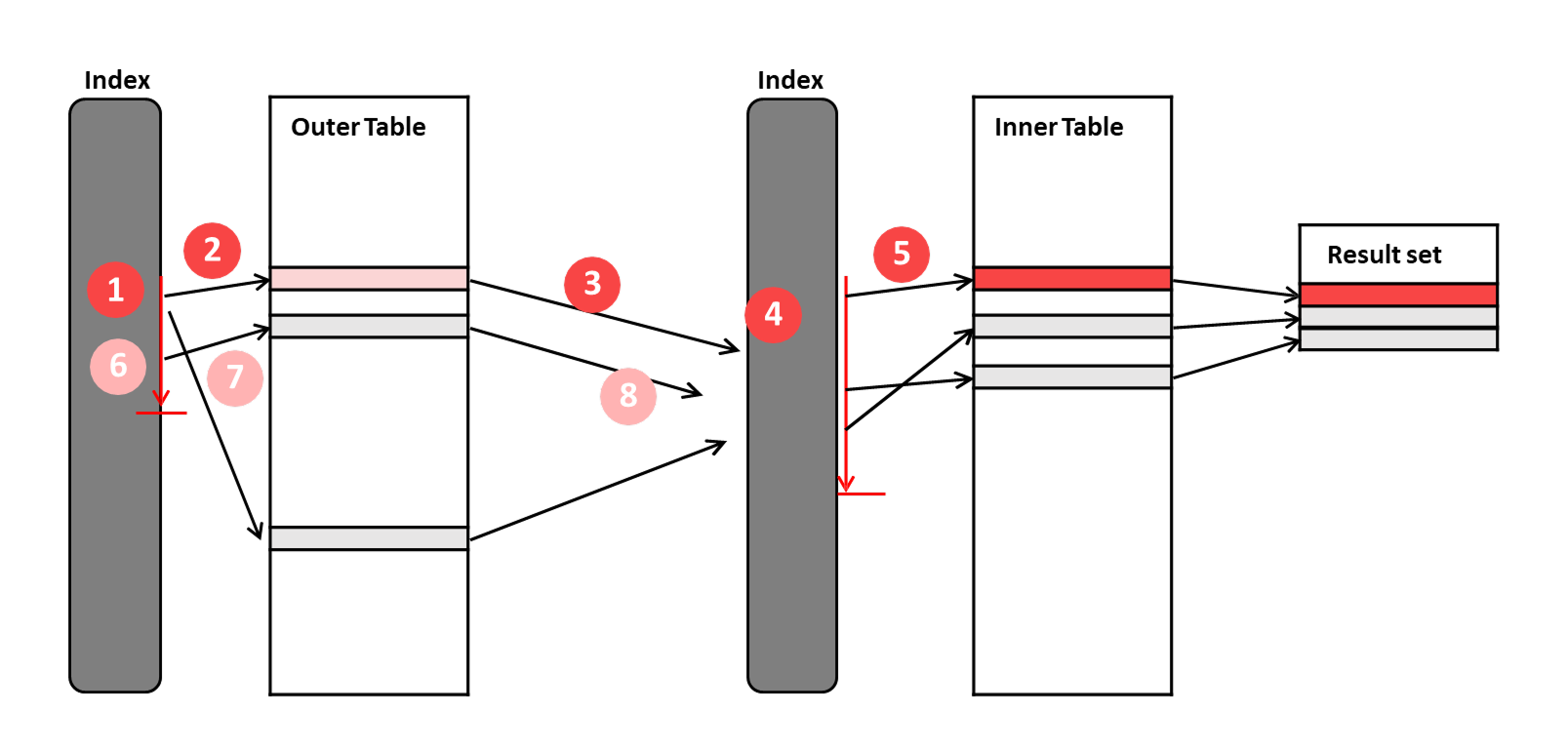
We'll use the order_items table for this experiment. It contains about 30 million records, and the only index is the primary key.
EXPLAIN ANALYZE
SELECT o.id, o.total_amount, p.name, oi.quantity, oi.unit_price
FROM orders o
JOIN order_items oi ON oi.order_id = o.id
JOIN products p ON p.id = oi.product_id
WHERE o.id = 4567890;
This query joins three tables and retrieves the details for a single order. The execution result is as follows.
mysql> EXPLAIN ANALYZE SELECT o.id, o.total_amount, p.name, oi.quantity, oi.unit_price FROM orders o JOIN order_items oi ON oi.order_id = o.id JOIN products
p ON p.id = oi.product_id WHERE o.id = 4567890;
+-------------------------------------------------------------------------------------------------------------------------------------------------------------+
| EXPLAIN                                                                                                                                                     |
+-------------------------------------------------------------------------------------------------------------------------------------------------------------+
| -> Nested loop inner join  (cost=6.22e+6 rows=2.92e+6) (actual time=4661..10367 rows=5 loops=1)
    -> Filter: (oi.order_id = 4567890)  (cost=3.02e+6 rows=2.92e+6) (actual time=4660..10365 rows=5 loops=1)
        -> Table scan on oi  (cost=3.02e+6 rows=29.2e+6) (actual time=8.51..9405 rows=30e+6 loops=1)
    -> Single-row index lookup on p using PRIMARY (id=oi.product_id)  (cost=0.999 rows=1) (actual time=0.346..0.346 rows=1 loops=5)
 |
+-------------------------------------------------------------------------------------------------------------------------------------------------------------+
1 row in set (10.37 sec)
Although three tables are joined, only the order_items and products tables appear in the execution plan.
orders is a single-row lookup by primary key (o.id = 4567890), so it can return at most one row.
MySQL reads it in advance during the optimization phase and replaces it with a constant.
This is the same behavior we saw earlier when we added the UNIQUE constraint.
In fact, if you look at the Filter node, it shows oi.order_id = 4567890 rather than oi.order_id = o.id.
The remaining two tables are processed as follows.
MySQL performs a full Table scan of the 30 million rows in order_items. As it scans the table, it filters for rows where order_id is 4567890.
Five rows pass the filter.
For each of those five rows, MySQL performs a Single-row index lookup on products, using the primary key to find the row whose id matches the product_id from order_items.
The full scan of order_items takes 9,405ms, and filtering takes 10,365ms to complete.
Meanwhile, the join with the products table runs loops=5, meaning it is executed five times.
At 0.346ms per lookup, that comes to about 1.7ms in total.
Out of the total 10,367ms, virtually none of the time was spent on the join itself.
Almost all of it was spent finding the five rows to join.
Now, let's add an index on order_id in the order_items table and run the query again.
mysql> EXPLAIN ANALYZE SELECT o.id, o.total_amount, p.name, oi.quantity, oi.unit_price FROM orders o JOIN order_items oi ON oi.order_id = o.id JOIN products
p ON p.id = oi.product_id WHERE o.id = 4567890;
+-------------------------------------------------------------------------------------------------------------------------------------------------------------+
| EXPLAIN                                                                                                                                                     |
+-------------------------------------------------------------------------------------------------------------------------------------------------------------+
| -> Nested loop inner join  (cost=11 rows=5) (actual time=0.0566..0.0813 rows=5 loops=1)
    -> Index lookup on oi using idx_order_items_order_id (order_id=4567890)  (cost=5.5 rows=5) (actual time=0.043..0.0461 rows=5 loops=1)
    -> Single-row index lookup on p using PRIMARY (id=oi.product_id)  (cost=1.01 rows=1) (actual time=0.00635..0.00639 rows=1 loops=5)
 |
+-------------------------------------------------------------------------------------------------------------------------------------------------------------+
1 row in set (0.00 sec)
Table scan and Filter have disappeared and been replaced by an Index lookup.
Because order_items is the outer table, this node is executed only once (loops=1), and it finds five rows.
However, idx_order_items_order_id does not contain quantity or unit_price, so it is not a covering index.
MySQL therefore has to traverse the clustered index once more for each of the five rows.
Those five rows then flow into the inner side one by one, where products is looked up using its primary key.
The total execution time is 0.0813ms.
| 단계 | 시간 |
|---|---|
No order_id index |
10,367ms |
With order_id index |
0.08ms |
A query that took more than 10 seconds now takes just 0.08ms. However, when it comes to joins, adding an index is not always the end of the story. As we saw earlier, Nested Loop Join repeatedly queries the inner table once for each row produced by the outer table. Which table is read first can also make a significant difference in performance.
Which Side Should Be Read First?
Earlier, we saw that Nested Loop Join repeatedly queries the inner table once for each row produced by the outer table. That also means that the table we read first determines the number of repetitions. Let's see how much of a difference this can make.
EXPLAIN ANALYZE
SELECT u.name, o.id, o.total_amount
FROM users u
JOIN orders o ON o.user_id = u.id
WHERE u.country_code = 'KR'
  AND o.status = 'PENDING'
  AND o.created_at >= '2026-08-20';
The result of running the query above is as follows.
mysql> EXPLAIN ANALYZE SELECT u.name, o.id, o.total_amount FROM users u JOIN orders o ON o.user_id = u.id WHERE u.country_code = 'KR'   AND o.status = 'PENDING'   AND o.created_at >= '2026-08-20';
+-----------------------------------------------------------------------------------------------------------------------------------------------------------------------------------------------------------------------------------------------------------------------------------------------------------+
| EXPLAIN                                                                                                                                                                                                                                                                                                   |
+-----------------------------------------------------------------------------------------------------------------------------------------------------------------------------------------------------------------------------------------------------------------------------------------------------------+
| -> Nested loop inner join  (cost=34347 rows=2230) (actual time=12.9..99.1 rows=3614 loops=1)
    -> Index range scan on o using idx_orders_status_created over (status = 'PENDING' AND '2026-08-20 00:00:00' <= created_at), with index condition: ((o.`status` = 'PENDING') and (o.created_at >= TIMESTAMP'2026-08-20 00:00:00'))  (cost=21371 rows=22298) (actual time=12.8..45.1 rows=11999 loops=1)
    -> Filter: (u.country_code = 'KR')  (cost=0.482 rows=0.1) (actual time=0.00438..0.0044 rows=0.301 loops=11999)
        -> Single-row index lookup on u using PRIMARY (id=o.user_id)  (cost=0.482 rows=1) (actual time=0.0042..0.00423 rows=1 loops=11999)
 |
+-----------------------------------------------------------------------------------------------------------------------------------------------------------------------------------------------------------------------------------------------------------------------------------------------------------+
1 row in set (0.11 sec)
The optimizer chose orders as the outer table.
Starting from the ('PENDING', '2026-08-20') point in the (status, created_at) composite index,
it reads sequentially until it reaches a row where status is no longer 'PENDING', retrieving 11,999 rows.
That's only 0.12% of the 10 million rows in the table.
These 11,999 rows then flow into the inner side one by one.
For each row, MySQL looks up the corresponding users by primary key and checks whether country_code = 'KR'.
In the end, 3,614 rows pass the filter.
The range scan takes 45.1ms, while the users lookup and filtering take 0.0044ms × 11,999, or about 52.8ms.
Combined, that's about 98ms, which is close to the actual measured time of 99.1ms.
Now, let's reverse the join order.
STRAIGHT_JOIN is MySQL syntax that forces the join to follow the order specified in the FROM clause, ignoring the optimizer's choice.
With this, users is read first.
EXPLAIN ANALYZE
SELECT u.name, o.id, o.total_amount
FROM users u
STRAIGHT_JOIN orders o ON o.user_id = u.id
WHERE u.country_code = 'KR'
  AND o.status = 'PENDING'
  AND o.created_at >= '2026-08-20';
Running the query above produces the following result.
mysql> EXPLAIN ANALYZE SELECT u.name, o.id, o.total_amount FROM users u STRAIGHT_JOIN orders o ON o.user_id = u.id WHERE u.country_code = 'KR'   AND o.status = 'PENDING'   AND o.created_at >= '2026-08-20';
+-------------------------------------------------------------------------------------------------------------------------------------------------------------------------------------------------------------------------------+
| EXPLAIN                                                                                                                                                                                                                       |
+-------------------------------------------------------------------------------------------------------------------------------------------------------------------------------------------------------------------------------+
| -> Nested loop inner join  (cost=921058 rows=9949) (actual time=1.58..2361 rows=3614 loops=1)
    -> Filter: (u.country_code = 'KR')  (cost=203102 rows=198976) (actual time=0.456..567 rows=601207 loops=1)
        -> Table scan on u  (cost=203102 rows=1.99e+6) (actual time=0.452..440 rows=2e+6 loops=1)
    -> Filter: (o.`status` = 'PENDING')  (cost=3.12 rows=0.05) (actual time=0.0029..0.0029 rows=0.00601 loops=601207)
        -> Index lookup on o using idx_orders_user_created (user_id=u.id), with index condition: (o.created_at >= TIMESTAMP'2026-08-20 00:00:00')  (cost=3.12 rows=4.9) (actual time=0.00278..0.0028 rows=0.0601 loops=601207)
 |
+-------------------------------------------------------------------------------------------------------------------------------------------------------------------------------------------------------------------------------+
1 row in set (2.37 sec)
The number of result rows is the same at 3,614, but the total execution time increased from 99.1ms to 2,361ms, about 24 times longer.
We can see why by looking at loops: it increased from 11,999 to 601,207, roughly 50 times.
Before reversing the join order, orders produced 11,999 rows and was used as the outer table. This time, users produced 601,207 rows.
Those numbers represent 0.12% and 30% of their respective tables.
Since as many as 600,000 of the 2 million users have country_code = 'KR', filtering them out has relatively little effect.
The inner-side orders lookup takes only 0.0029ms each time.
However, repeating it 601,207 times brings the total to about 1,743ms.
Adding the 567ms spent scanning users gives 2,310ms, which is very close to the actual execution time of 2,361ms.
| Outer rows | Inner iterations | Time | |
|---|---|---|---|
| `orders first (optimizer choice) | 11,999 | 11,999회 | 99.1ms |
users first (`STRAIGHT_JOIN) |
601,207 | 601,207회 | 2,361ms |
One more thing to pay attention to is that the two execution plans use different indexes.
When orders is the outer table, it is accessed directly through the WHERE conditions, so it uses the (status, created_at) index.
When orders is the inner table, it needs to be accessed through the join condition o.user_id = u.id, so it uses the (user_id, created_at) index.
So, changing the join order doesn't just change the number of repetitions. It also changes which index is used.
Wrapping Up
The query that took 2,530ms without an index now takes just 0.6ms with a covering index. And the join that took more than 10 seconds now takes just 0.08ms. At the scale of data found in real-world applications, indexes aren't just nice to have. Without them, it's difficult for a service to function at all.
Adding an index isn't necessarily the end of the story, either. Even with the same indexes, the performance differed by 24× depending on which table was read first.
There was one pattern I noticed throughout the experiments: slow queries weren't slow because the computation itself was expensive. They were slow because they had to read a lot of data. In the 2,530ms query, only about 1ms was spent sorting. In the 10-second join, only 1.7ms was spent on the join itself. The rest of the time was spent reading millions or tens of millions of rows just to find the few rows we actually needed. An index is a tool for reducing the amount of data that needs to be read, while join order determines how many times that amount of work is repeated.
Of course, indexes aren't free.
Earlier, creating the (user_id, created_at) index took 31.75 seconds.
That's a one-time cost when the index is created, but from then on, the index also needs to be updated every time an INSERT occurs.
On tables with frequent writes, an index added for read performance can actually hurt performance in return.
In the next article, we'll see how much slower INSERT becomes as the number of indexes increases.
Comments0